Recruit Assist

Your go to conversational friendly recruitment platform along with AI

TL;DR

Automate screening, accelerate hiring, and engage top talent with AI for Recruiting, designed for enterprises.

Recruit Assist is an AI-powered enterprise recruitment platform that helps recruiters and hiring managers automate tasks like resume screening, candidate matching, interview planning, and hiring workflows. As the Product Designer, I owned the end-to-end UX process from user research and information architecture to user flows, wireframes, prototypes, and high-fidelity designs. I worked closely with product managers and engineers to design intuitive, transparent AI experiences while keeping recruiters in control through a human-in-the-loop approach.

DOMAIN

B2B | Saas

ROLE

Product Designer
(Solo)

DURATION

7 months

TEAM

Design Manager
Product Managers
Developers

What I was responsible for

  • Led end-to-end 0→1 design across JD Generation, Resume Screening, Interview Scheduling, AI Feedback, and Analytics.


  • Explored 3 product concepts (Web App, MS Teams Bot, Browser Extension) before defining the final product direction.


  • Conducted competitive analysis across leading AI recruitment platforms to identify market opportunities.


  • Presented designs through multiple stakeholder reviews, iterating based on leadership and client feedback.


  • Showcased interactive prototypes to enterprise clients, supporting product validation and adoption.

WHAT I DID BEFORE STARTING THE FINAL DESIGN

Started understanding the problem space with
stakeholders & Team

Based on our interactions with these clients, we have

identified certain problems and use cases as part of the MVP

focused on the recruiter and hiring manager personas.

Based on our interactions with these clients, we have

identified certain problems and use cases as part of the MVP focused on the recruiter and hiring manager personas.

The Problem

Recruiters spending their time in many different places

Initial findings

Hello world

Poor job descriptions attract unqualified candidates, reduce applicant quality, and introduce hiring bias.

Hello world

18% of recruiters’ time is spent on screening candidates and another 11% on administrative and other related tasks.

Hello world

Traditional ATS platforms lack real-time insights, leading to slower, less informed hiring decisions.

Recruting Issues

Hello world

Lengthy hiring processes increase recruitment costs and result in losing top talent.

Hello world

76% Recruiters struggle to attract qualified candidates, impacting productivity and hiring quality.

Hello world

Limited focus on diversity reduces inclusive hiring and long-term business performance.

Current Recruiter Journey

Recruiters weren't failing because they lacked effort or skill. They were failing because their tools demanded too much effort for too little intelligence. Traditional ATS systems bypassed real-time feedback, lacked AI-assisted decision-making, and forced constant context-switching across disconnected platforms.

UNDERSTANDING THE PROBLEM THROUGH USER PERSONAS & COMPETITIVE ANALYSIS.

User Personas

Lana Ray, 37 - Hiring Manager, Product Team


Lana is a busy hiring manager who collaborates with the recruiting team through all hiring stages to find the perfect candidates for her huge PM department.


Pain points

  • Receives candidate names but no context no explanation of why someone was shortlisted, no comparative view

  • Has to write interview feedback from scratch after every session, often hours or days later

  • No structured way to communicate her decision back to the recruiter it all happens over email or Slack

Goals

  • She aims to enhance business outcomes through improved performance and productivity, aligning with her department's hiring needs and collaborating seamlessly with the recruiting team to achieve swift time-to-hire.

John Scott, 33 - Head of Recruitment


John is a recruiter who regularly collaborates with other stakeholders and uses an ATS to conduct his daily recruitment activities.


Pain points

  • Writes JDs from scratch for every new role, often starting from a blank page

  • Reviews resumes one by one against a mental model of what "good" looks like

  • Spends hours chasing panelists for calendar availability and sending back-and-forth scheduling emails

  • Has no real-time visibility into where candidates are in the pipeline unless he manually checks the ATS

Goals

  • John wishes to best utilize his time by working on high-value activities such as candidate interactions to achieve efficiency, productivity, and engagement for his business.

What Users preferred:

- Experience for Recruiter - Webapp with a bot
- Experience for Hiring Manager - Webapp or a bot
- Experience for Candidate - Bot

Competitive analysis - Recruitment

Exisiting Capability

Roadmap

No Capability

Limited Capability

Goals

User Goal: Find and hire the right candidate faster.

Business Goal: Reduce time-to-hire and increase recruiter productivity.

User Goal: Automate repetitive hiring tasks with AI.

Business Goal: Lower operational costs and improve recruitment efficiency.

User Goal: Make confident, data-driven hiring decisions.

Business Goal: Improve the quality of hires and increase hiring success rates.

DESIGN PROCESS

Strategic Design Approach - Choosing the Right Product form.

CONCEPT 1 — Microsoft Teams Bot ⚡ Secondary Channel

Recruiters and hiring managers interact with RecruitAssist directly within Teams.


Why not selected: Useful for hiring managers, but limited for recruiters who need rich candidate views and workflows. Retained as a complementary channel.

CONCEPT 2 — ATS Browser Plugin ❌ Rejected

An AI assistant layered on top of existing ATS platforms like SAP SuccessFactors.


Why rejected: Poor user experience, high maintenance effort, and continued dependence on fragmented ATS workflows.

CONCEPT 3 — Standalone Web App ✅ Selected

A dedicated recruiter workspace with an AI assistant embedded across the product. Candidate data, jobs, interviews, and actions live in one place, eliminating context switching and creating a seamless hiring workflow.


Why selected: Best recruiter experience, lowest development effort, and a single source of truth.

Choosing Concept 3 was more than a UI decision it was a product strategy decision. Recruiters needed a dedicated workspace built around their workflow, not another layer on top of existing tools. This direction influenced the product roadmap, go-to-market strategy, and overall positioning in the AI recruitment space.

Hypothesis - Concept Comparison for Recruiter Persona

Switch between RA webapp and ATS will be minimal and easy with navigation links

Recruiters may not switch from ATS to Teams only for bot’s functionality

RA bot in Teams channel benefits the hiring manager as it the primary usage channel for them

Webapp navigation for Concept 3 will lead to confusion for the recruiter and also involve high dev efforts

Recreated the Recruiter Journey (AI assisted)

AI USE CASES

AI Content Generation

  • Job Descriptions

  • Candidate Emails

  • Interview Questions

AI Search & Discovery

  • Smart Search

  • Candidate Matching

AI Screening & Summarization

  • Resume Parsing

  • Candidate Summaries

  • Resume Screening

AI Ranking &
Recommendations

  • Candidate Scoring

  • Shortlisting

  • Best-fit Recommendations

AI Automation

  • Workflow Automation

  • Scheduling Support

  • Recruitment Process Optimization

AI Insights

  • Hiring Analytics

  • Pipeline Insights

  • Decision Support

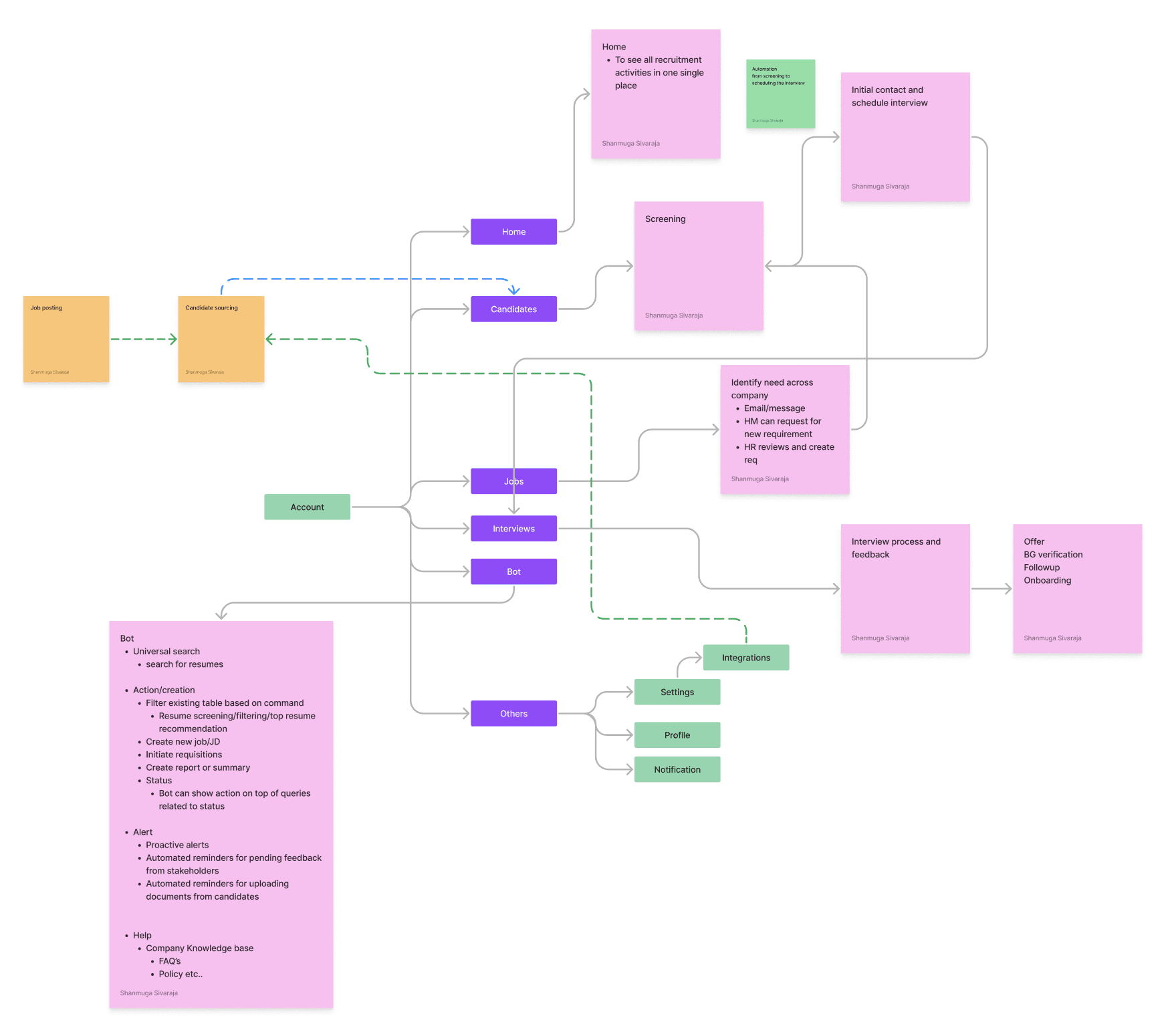
Information architecture

Working my way down, thinking from a high level structure…

Proposed the following design interventention while bulding the product.

Recruiter

Dashboard view with major recruitment metric movers. Automation in time-intensive tasks such as JD creation, sourcing, screening, and interview scheduling to save time and decrease costs.

Panelist

Interview questionnaire generation to drill down on the actual candidate skill set. Smart pre-fill of candidate feedback form to speed up their tasks.

Hiring Manager

Leverage a candidate ranking and evaluation tool to evaluate candidate-job fit percentage and avoid mis-hires in the team.

Recruiter

Dashboard view with major recruitment metric movers. Automation in time-intensive tasks such as JD creation, sourcing, screening, and interview scheduling to save time and decrease costs.

Hiring Manager

Leverage a candidate ranking and evaluation tool to evaluate candidate-job fit percentage and avoid mis-hires in the team.

Panelist

Interview questionnaire generation to drill down on the actual candidate skill set. Smart pre-fill of candidate feedback form to speed up their tasks.

Wireframes

DESIGN SYSTEM & ACCESSIBILITY

🎨 Design System
(AIR Design system with AIR Icons )

  • Reusable components

  • Consistent typography & spacing

  • Standardized forms & tables

  • AI interaction patterns

  • Responsive layouts

  • Developer-friendly design tokens

♿ Accessibility (WCAG 2.1 AA)

  • WCAG 2.1 AA compliant color contrast

  • Clear visual hierarchy & typography

  • Color independent status indicators

  • Keyboard friendly navigation

  • Accessible forms & error states

  • Adequate touch target sizes

  • Simple, readable language

  • Explainable AI interactions for user trust

SOLUTION IN DETAIL V1

  1. DASHBOARD

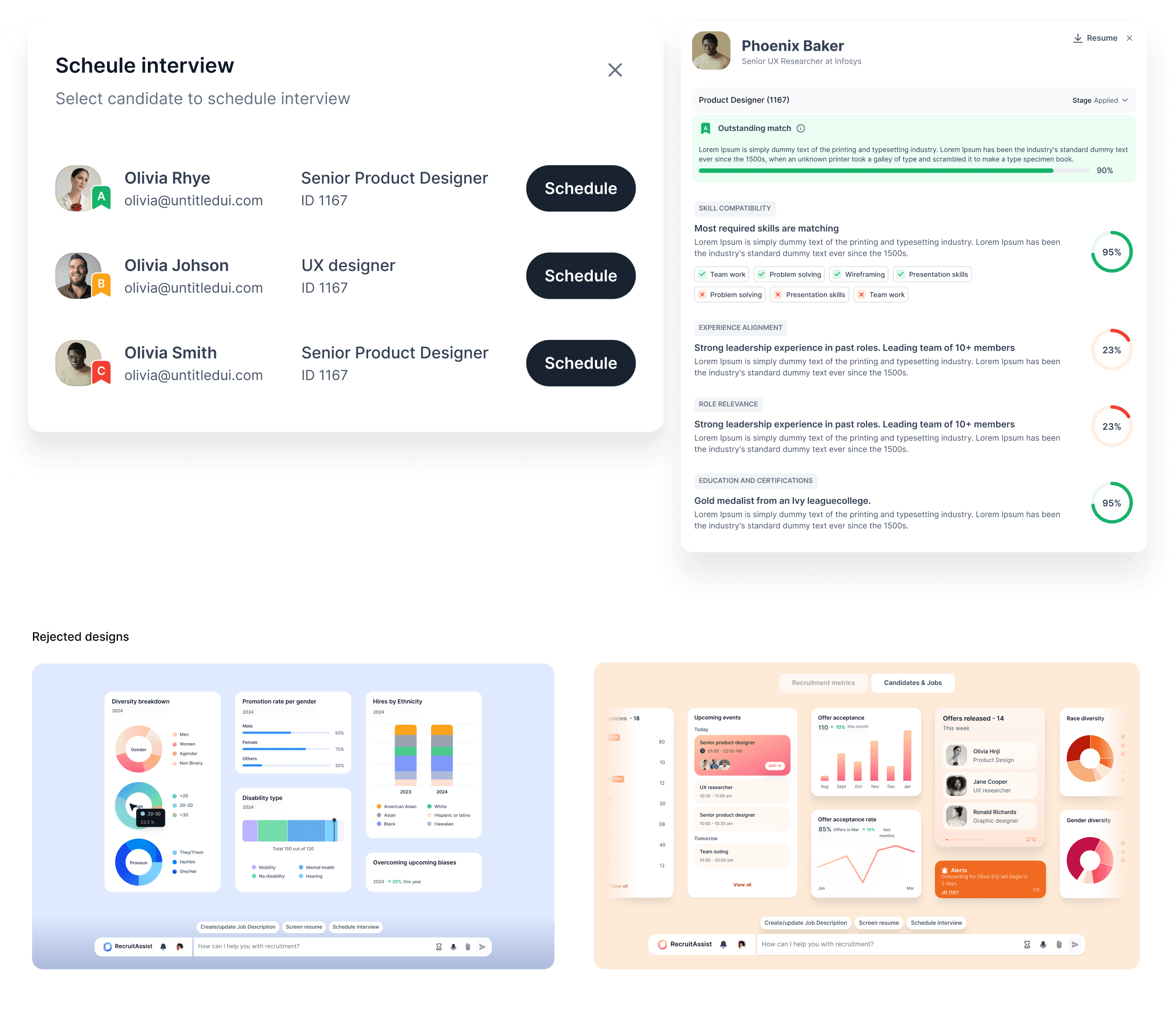
  1. JD CREATION + AI EDITOR & TAGGING FEATURE

  1. SCREENING OF CANDIDATES & SUCCESS METRICS

  1. SCHEDULING INTERVIEW FULLY CHAT BASED & ALLOCATING

THE INTERVIEWER & SHORLISTED CANDIDATES

  1. FEEDBACK FORM OF CANDIDATES & RATING SECTIONS

USABILITY TESTING V1

I conducted moderated usability testing using interactive Figma prototypes with 5–6 participants, including recruiters, hiring managers, product managers, and internal stakeholders familiar with enterprise hiring workflows. The objective was to validate whether users could complete key recruitment tasks efficiently while building trust in AI-assisted features.


Tasks Tested

  • Create a Job Description using AI

  • Screen and shortlist candidates

  • Review AI match scores

  • Schedule interviews

  • Submit interview feedback

Method

  • Task-based testing

  • Prototype walkthroughs

Insights collected from the testing phase

Problem: Users overlooked the AI chat.
Solution: Made AI the primary entry point with quick action prompts.

Problem: Users saw AI scores but not the reasoning.
Solution: Displayed key match insights directly on candidate cards.

Problem: Blank prompts caused hesitation.
Solution: Suggested existing JD templates before AI generation.

Problem: Users hesitated to trust AI-generated feedback.
Solution: Clearly labeled feedback as AI-generated and editable.

Problem: Rankings lacked clear next steps.
Solution: Added contextual actions like Offer, Next Round, and Reject.

Problem: All the major navigations are at bottom. users felt empty around
Solution: Added a side left navigation panel with all features and made the search bar a seperate entity.

Outcomes from testing

  • 100% task completion after Round 1 usability improvements.

  • 80% faster first interaction reduced from 3m 40s to under 30s.

  • First commercial commitment secured after Round 2 improvements.

  • 40% faster feedback submissions with zero hesitation around AI transparency.

  • Core hypothesis validated 100% of participants preferred the conversational

interface over traditional ATS workflows.

FINAL DESIGN - IMPLEMENTED V2

Two Themes Implemented - Apricot, Blueberry

KEY LEARNINGS

  • Built trust in AI through transparent, explainable, and human-in-the-loop experiences.

  • Validated design decisions with early usability testing and research-driven iterations.

  • Collaborated effectively with cross functional teams to align user, business, and technical goals.

  • Strengthened leadership through mentoring, constructive feedback, and continuous design audits.

  • Built trust in AI through transparent, explainable, and human-in-the-loop experiences.

  • Validated design decisions with early usability testing and research-driven iterations.

  • Collaborated effectively with cross functional teams to align user, business, and technical goals.

  • Strengthened leadership through mentoring, constructive feedback, and continuous design audits.

  • Built trust in AI through transparent, explainable, and human-in-the-loop experiences.

  • Validated design decisions with early usability testing and research-driven iterations.

  • Collaborated effectively with cross functional teams to align user, business, and technical goals.

  • Strengthened leadership through mentoring, constructive feedback, and continuous design audits.

THAT'S A WRAP, HOPE YOU LIKED IT :P

Create a free website with Framer, the website builder loved by startups, designers and agencies.